Understanding TradingView's charts and timeframes

7 minute read
|4 Nov 2025
Understanding TradingView-s charts and timeframes 1

This article is brought to you by TradingView 

TradingView is a leading platform used by traders, investors, and analysts worldwide. Whether you're trading stocks, ETFs or cryptocurrencies, TradingView offers a comprehensive set of tools to analyse markets effectively. 

In this article, we will explore how TradingView charts work, how to customise timeframes for various trading strategies, and how these features empower traders to interpret market movements precisely. 

Visualising markets with TradingView charts 

TradingView charts are designed to be transparent, flexible, and highly customisable, enabling users to visualise market trends, price action, and volume with ease. With access to millions of assets, from popular stocks like NVIDIA to trending cryptocurrencies like Ethereum, these charts deliver real-time data that can be tailored to suit individual or group trading styles and preferences. 

TradingView helps investors apply technical analysis, the study of historical price movements and trading volumes used to better understand market behaviour. This approach allows traders to interpret price action, recognise patterns, and identify potential future trends based on how markets have reacted in the past. Unlike fundamental analysis, which focuses on economic factors or company performance, technical analysis centres on chart patterns, indicators, and price action to guide trading decisions. 

TradingView streamlines this process by offering a fast, intuitive, and visually clean interface. Whether you're scanning markets for a quick overview or conducting deep analysis, TradingView minimises the time and mental effort needed to perform technical research. 

Chart types explained 

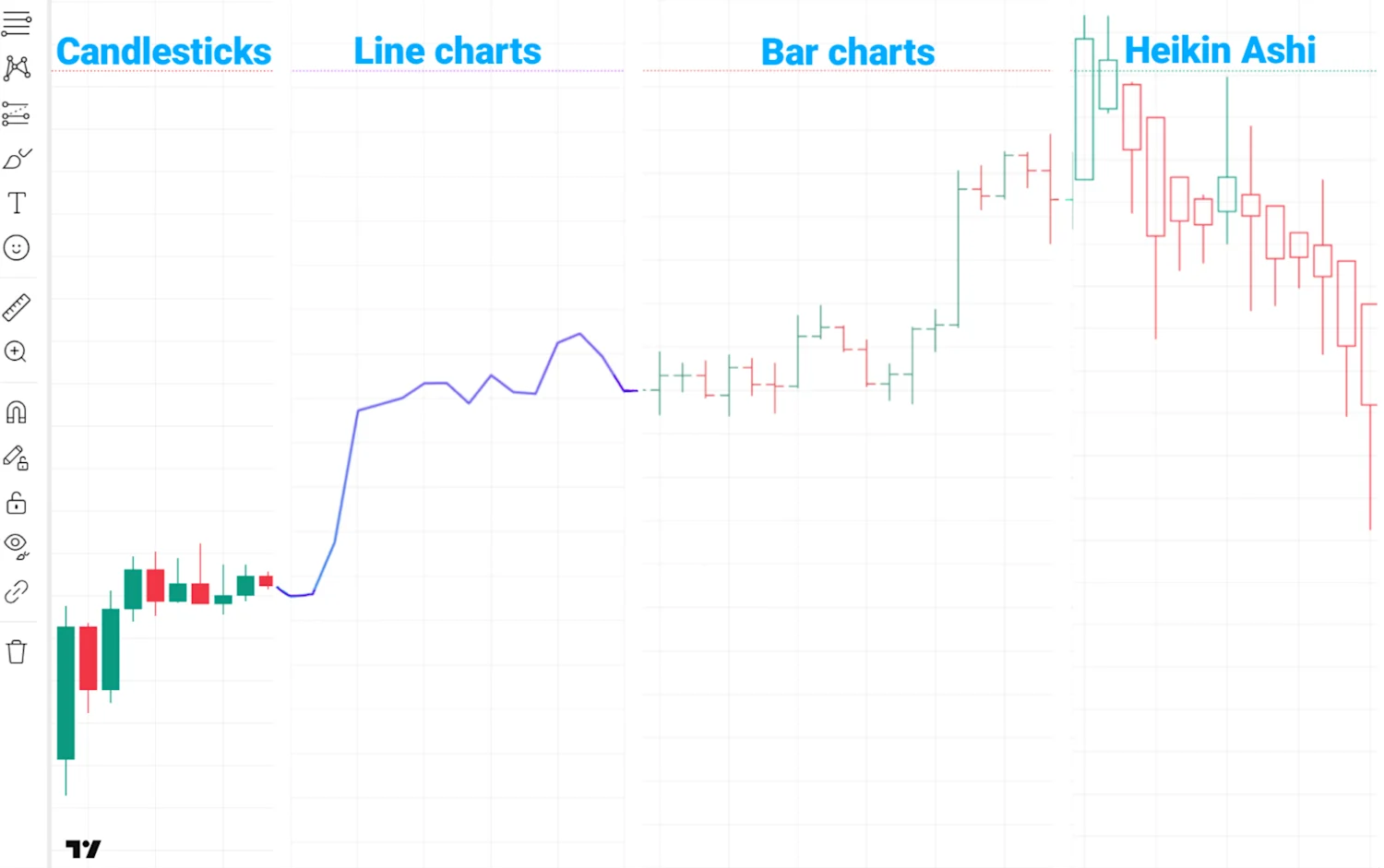
To accommodate different analytical approaches, TradingView supports a great diversity of chart types including: 

  • Candlestick Charts: The most commonly used chart by traders. Each "candle" displays four essential data points — open, high, low, and close (OHLC). Candlesticks provide visual insight into market sentiment and price momentum. 

  • Line Charts: A simple chart that represents closing prices over time. Ideal for beginners or those focusing on long-term trends. 

  • Bar Charts: Similar to candlesticks but displayed as vertical bars. They show the same OHLC data but are less visually intuitive. 

  • Heikin Ashi: A smoothed version of candlestick charts that filters out market noise and helps identify trends more clearly. 

Every chart type serves a unique purpose, and TradingView allows users to switch between them effortlessly, depending on their analysis goals. Once the chart type has been selected, the next step is choosing a timeframe. 
updated chart types

Timeframes

A timeframe determines how much market data is compressed into a single unit (candle, bar, or point) on the chart. Selecting the right timeframe is essential as it directly affects how price action is interpreted. 

TradingView offers a wide range of built-in timeframes: 

  • Intraday: 1-minute, 3-minute, 5-minute, 15-minute, 30-minute 

  • Hourly: 1-hour, 2-hour, 4-hour 

  • Daily & Weekly: 1-day, 1-week 

  • Monthly: 1-month 

Different timeframes may often be associated with different trading styles: 

  • 1m - 15m: Ideal for scalping and intraday trading 

  • 1h - 4h: Suitable for swing trading and short-term analysis 

  • 1D - 1W: Best for medium- to long-term strategies 

  • 1M: Used for analysing macro trends and long-term investment outlooks 

Advanced users can also create custom timeframes. For instance, if your strategy requires more detailed or adaptable data segmentation, you can use a 2-minute or 3-month interval to better match your analysis needs. 

Advanced tools for deeper market analysis

Beyond chart types and timeframes, TradingView offers an extensive toolkit to enhance your market analysis: 

  • Technical Indicators: Choose from a vast library of in-built indicators such as RSI, MACD, or Bollinger Bands, or upload your custom indicators written in Pine Script. 

  • Drawing Tools: Annotate your charts with trendlines, Fibonacci retracements, shapes, text, and even emojis. 

  • Projections: Visualise potential future price movements with the Forecast, Bars Pattern, and Ghost Feed tools. These features help traders project scenarios based on past data or user-drawn patterns, and compare current market structure to previous phases. 

Case study: CBA’s recent momentum 

Now that we’ve covered an overview of TradingView’s chart types, timeframes and tools, let’s take a look at how an investor might apply these in practice through the process of technical analysis.

CBA Technical Analysis

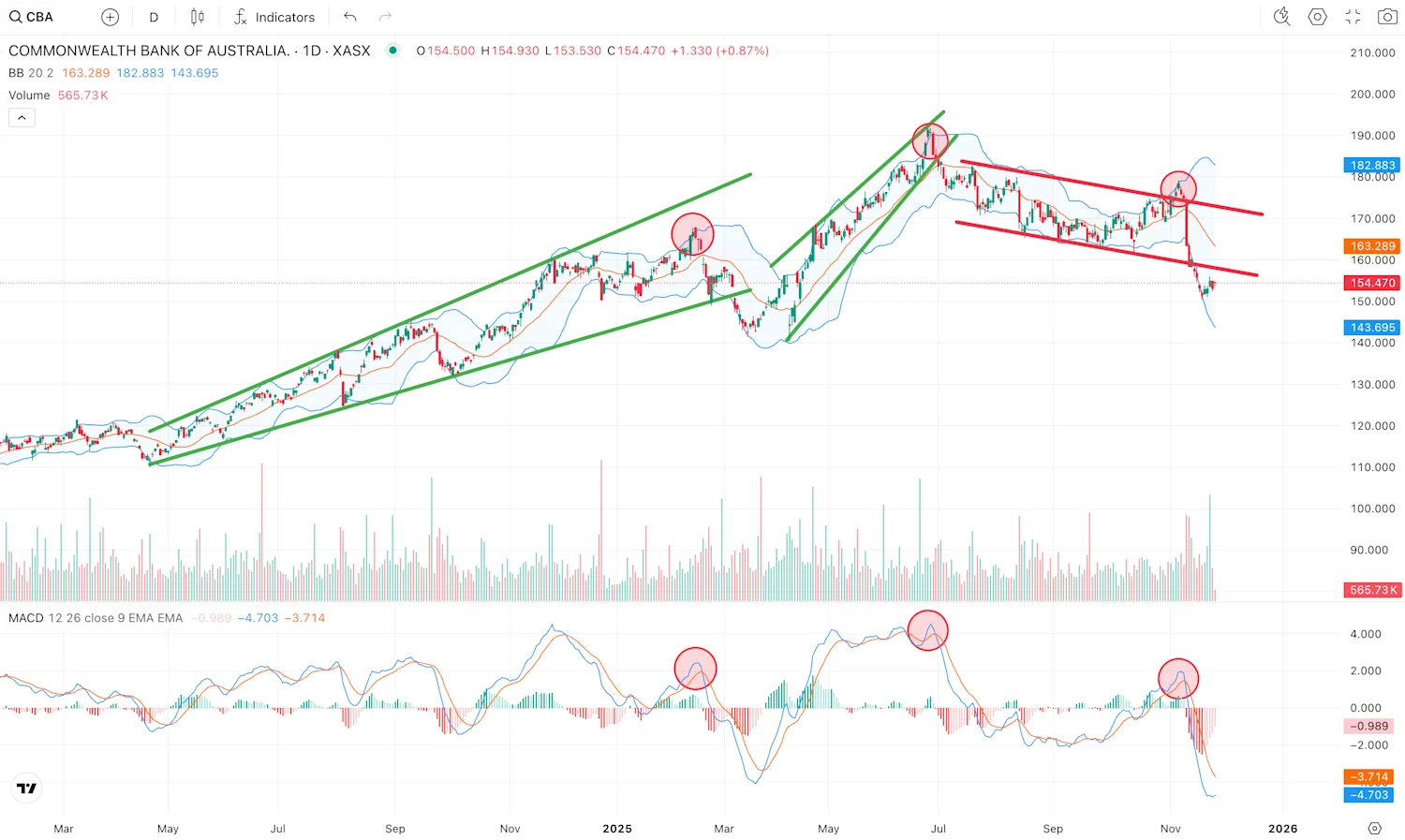
This technical analysis of Commonwealth Bank of Australia (CBA) looks at how the share price has moved since May 2025. The chart shows three wedge or channel-shaped structures where the price has traded within clearly defined boundaries. Each time the price moved below one of these wedges, it marked an important turning point. The first break in March 2025 saw the price dip briefly before continuing sharply higher, while the second break in late June 2025 led to a sustained downward move.

The MACD (Moving Average Convergence Divergence) indicator below the chart helps show changes in momentum, or the strength behind a price move. When the MACD line crosses below the signal line, it can suggest that buying momentum is slowing and selling pressure is building. If we look at the two green wedges, in both cases the MACD crossover (highlighted in the red circle) occurred shortly before CBA broke downward out of the wedge pattern. Investors monitoring the MACD, followed by the break downward from the wedge structure, may have observed the crossover as an indication that selling pressure was building at that time.

Overall, different investors may interpret this chart in their own way, using a range of tools and patterns to form views about the stock’s future direction. Similar setups can lead to different outcomes depending on factors such as market conditions, trading volume and recent price trends. It is also worth noting that many market participants, from individual investors to large institutional traders, use charts as part of their analysis. As a result, certain price levels or patterns may attract wider attention across the market. Being aware of commonly observed areas on a chart, such as trendlines, previous support and resistance levels, and key price levels that may influence investor behaviour or psychology (for example, in the case of CBA, $100 or $200), can help provide additional context when reviewing price movements. Technical analysis is not about predicting with certainty, but about using structure and evidence to understand price behaviour and manage risk more effectively as part of your overall toolkit.

Conclusion

There are many ways to analyse a chart, and no single method works all the time. Using a mix of indicators, such as chart patterns and momentum tools, can help traders gain more confidence when identifying potential shifts in price direction. However, it’s important to remember that no single indicator is always accurate. Technical signals should be used together with other information, such as company fundamentals, market trends, and broader economic conditions, to build a clearer picture of what might come next. 

Charting and forecasting tools ultimately help traders anticipate potential market movements and make informed decisions. But the final call always rests with the investor, and it is important to think critically and act cautiously before making any investment.

Trade smarter with TradingView on CMC Invest

See your investments in a new light. TradingView on CMC Invest brings professional charting to your shares, ETFs and cryptocurrencies, all in one seamless experience.

Track price action with precision. Explore multiple chart types, timeframes and popular indicators like RSI and MACD. Draw, analyse and plan your next move with powerful tools built directly into your platform.

On desktop

  1. Search for any instrument in the top bar

  2. Select the advanced chart icon to open a full screen TradingView experience

On mobile

  1. Search for your instrument

  2. This opens the product overview, where the TradingView chart appears by default

  3. Tap the two circle icons to switch chart style or enter full screen mode for analysis on the go

New to the platform? Watch our platform video guide to explore what’s on offer and learn how to open TradingView on desktop.

Login or create your CMC Invest account to start charting today.

Disclaimer: The research content has been prepared by third party provider, TradingView ©. CMC Invest shall not be held responsible for any loss that you may incur, either directly or indirectly, arising from any investment based on, or otherwise as the result of the correctness, completeness, accuracy, currency, or timeliness of the research or from any reliance on the research provided. 

Invest with Australia's favourite non-bank stockbroker.
$0 brokerage on the ASX* and in the US, UK, Canada and Japan^
Access 45,000+ stocks, ETFs and more from one account
Canstar Broker of the Year –15 years in a row
*First buy up to $1,000, per security, per day. Excludes margin loan settled trades.^FX spreads apply.
Support
Support
x

Welcome to CMC Markets Support!

To begin, please select the product your query is related to.