When trading CFDs, our CMC Markets Platform provides a number of trading tools to help you analyse the markets and identify potential trading opportunities.

CMC Platform Trading Tools
Est. 1989
1M+ global clients
LSE Listed
Winner 2024-2026
Best for Foreign Exchange Trading
WeMoney
Winner 2025
Best Mobile Trading Platform
ADVFN International Financial Awards 2025
Winner 2025
Most Currency Pairs
ForexBrokers
Winner 2024-2026
Best for CFDs
WeMoney
Winner 2025
#1 Commissions & Fees
ForexBrokers
Tools built with your success in mind
We know a successful trader is a happy trader, which is why we are constantly developing tools designed to give you high-quality information.
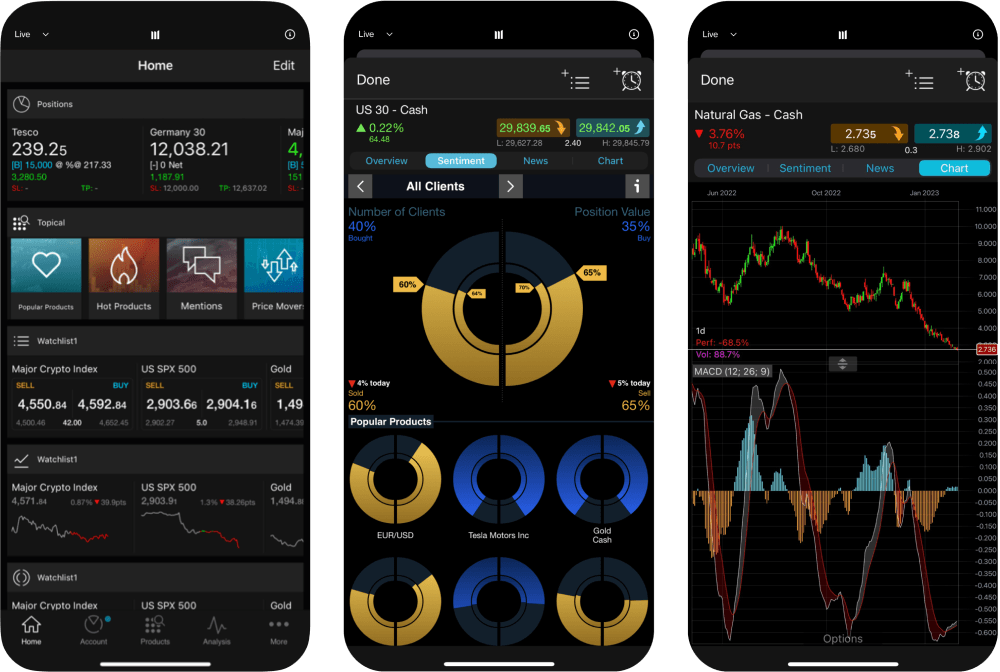
Client sentiment tracker
Our client sentiment feature shows you the percentage of CMC Markets clients who have bought versus the percentage who have sold on a particular product, so you can gain an understanding of other clients' expectations. You can also see the monetary value of these positions as a percentage.
'All' and 'Top' client data
You can choose to view data for ’All Clients’ with an open position in a product, or filter out the noise by switching to the 'Top Clients’ view to see data from only top clients who have made an overall profit on their account over the last three months.
Updated every minute
Our client sentiment analysis data is updated every minute, meaning these valuable insights are based on almost real-time information. This is especially useful during volatile periods when market prices can change rapidly.
See sentiment changes
Compare the up-to-the-minute sentiment the previous day to see recent changes in client trading.
Get trade ideas
Use the 'Also being Traded' section as a source of trading ideas. It shows which other products are being traded by clients that are currently trading the product you're viewing.
Pattern recognition scanner
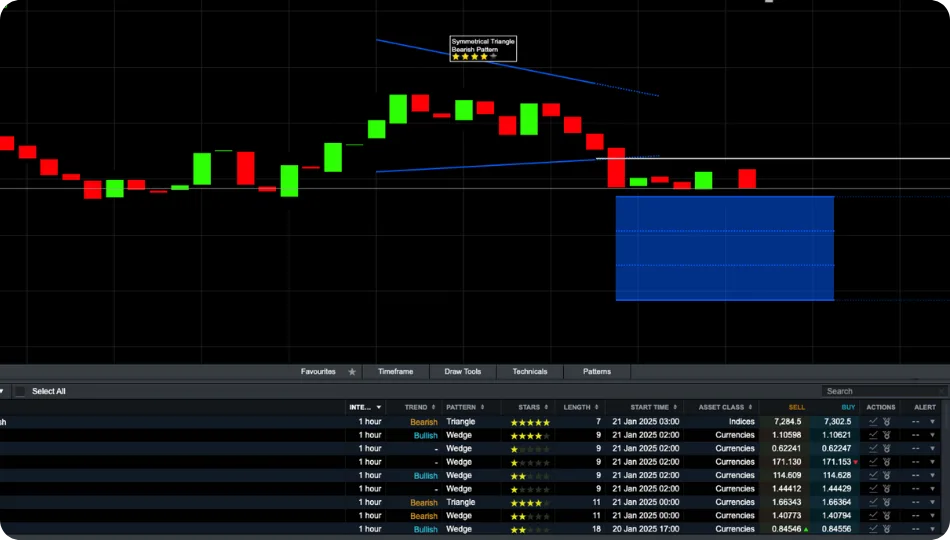
Pattern recognition scanner is another feature of our platform trading tools. Scan over 120 of our most popular products every 15 minutes for emerging and completed chart trading patterns such as wedges, channels and head and shoulders formations. Set up automatic alerts so you're notified of technical trade set-ups and potential trading opportunities.
Price projection box
When patterns complete, a price projection box is generated using technical analysis measuring techniques to highlight where the price action could go on the instrument's chart. You can use the inbuilt backtesting tool to measure the historical performance of each pattern and see how frequently price has hit the projection box.
Free candlestick pattern scanner
Trading patterns are most commonly displayed on candlestick charts, although we offer a variety of chart types, such as line graphs, bar graphs and Renko charts. This allows you to display your data in the clearest way possible that makes it easier for you to understand.
Advanced order execution
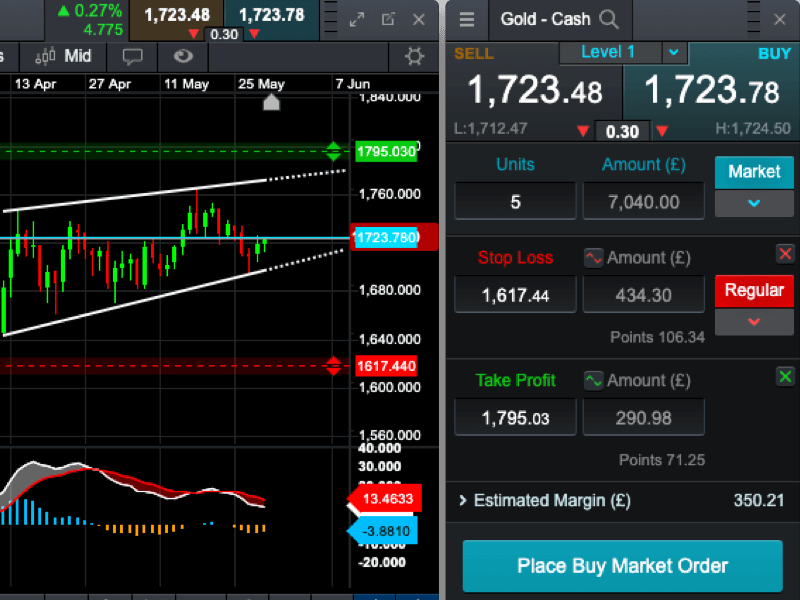
Access a range of advanced order types, including trailing and guaranteed stop losses, partial closure, market orders and boundary orders on every trade.
Stop-loss orders
Setting a stop-loss order is prudent when trading and imperative for helping to manage risk as well as protecting your profits. A stop-loss order set will stay in effect either until it’s triggered, cancelled or your position is liquidated.
Limit orders
Limit orders can trigger a buy or sell trade at a specified price that is above or below the current market price and are effective at controlling the prices that you trade. These can be used alongside stop-loss orders in order to prevent losses as much as possible.
Boundary orders
Boundaries orders provide greater control and helps maintain more precise control over their entry points, ensuring that trades are executed within their preferred price range.
One-click trading
A tool for experienced traders, 1-click trading feature allows to open or close a trade with just one click. There is no need to confirm the order as it will be placed immediately. Execution alerts appear after placing or closing an order, showing the price, trade size, stop loss, take profit, and realized profit or loss.
Learn more about CFD Trading Tools
- Popular trading tools for new tradersLearn More
Regardless of what asset class you are focusing on, there are three types of tools that every trader should consider: fundamentals, technical and sentiment.
- What is a trailing stop loss order?Learn More
Trailing stop-losses are similar to traditional stop-loss orders, but rather than remaining at a specific price level, a trailing stop-loss follows behind the price when it moves in a favourable direction.
- Stop-loss orderLearn More
A stop-loss aims to cap your losses by closing you out of the trade once your pre-determined figure has been reached.

Supercharged charting for every type of trader
- Industry leading charts

- Unmissable alerts

- Advanced technical analysis

- Strategy tester



Join over 1 million global traders and investors
1
2
3